Run Your Campsite From Anywhere — Web or Mobile
One System, However You Work System for Tents, Glamping and more.


However You Run Your Site, There's a Way In
No two campsites are run the same way, and the software shouldn't pretend otherwise. Some sites are managed from an office with a proper desk and a big screen. Some are run entirely from a warden's pocket as they walk the rows and greet arrivals. Most are a bit of both, and which one matters changes with the season, the weather and who happens to be on shift. The Campsite Booking System gives you a dedicated platform for each of those situations, and every one of them works from the same single source of live data.
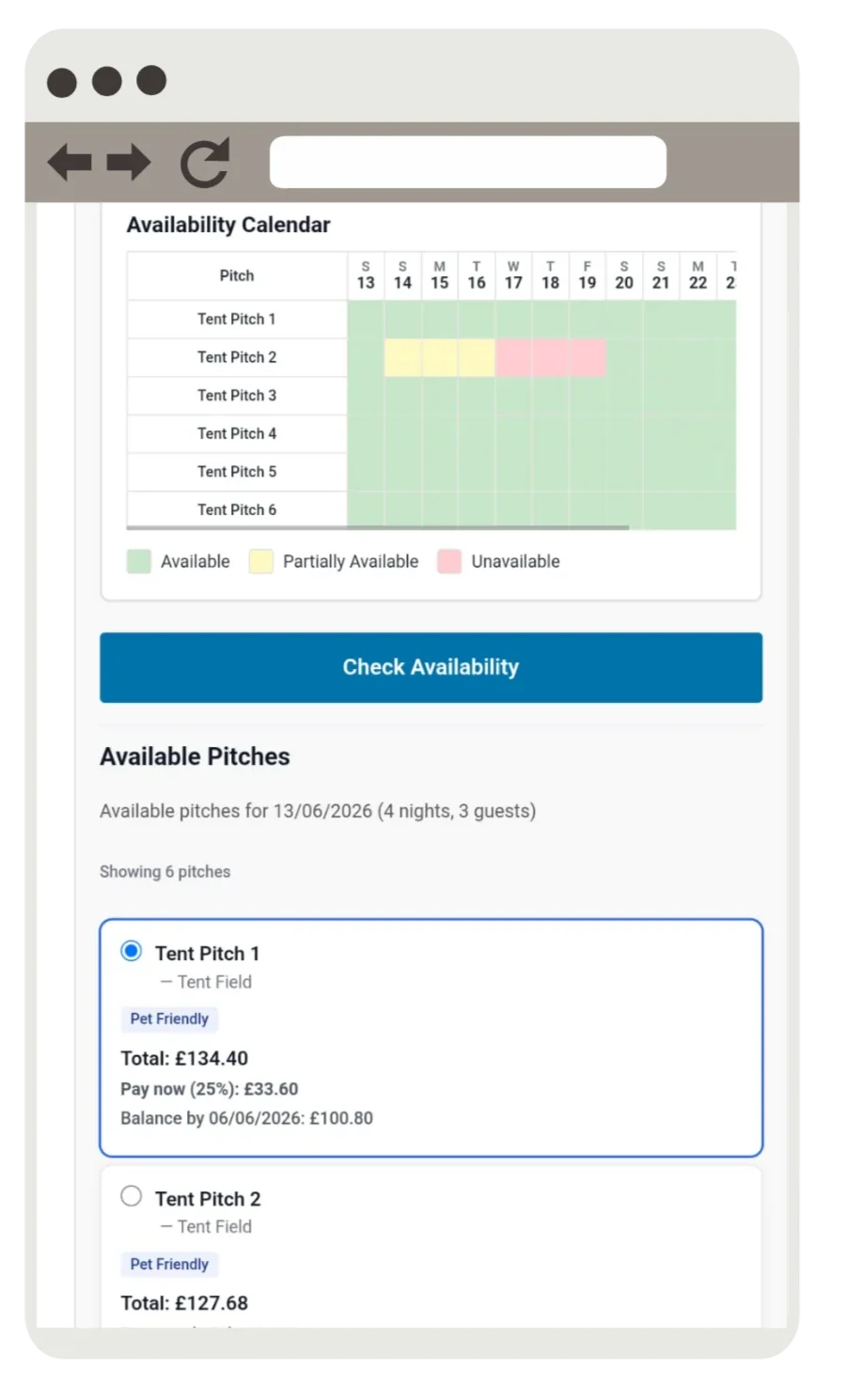
The web app. Open it in any modern browser, on any device, with nothing to install and nothing to keep updated. It's the fastest way to glance at the diary from a laptop, a borrowed office computer, or a tablet propped behind the bar. Because it lives in the browser, it's also the one platform you can always reach — which makes it the natural safety net for the days when a phone is flat or an app is mid-update.
The mobile apps. Native iPhone and Android apps built for the work that happens away from the desk. Check arrivals in at the gate, take a booking from someone who's just pulled up hopeful, move a pitch or note a problem while you're stood right beside the caravan. Everything updates the moment you tap, so the office screen is never out of step with what's actually happening on the ground.
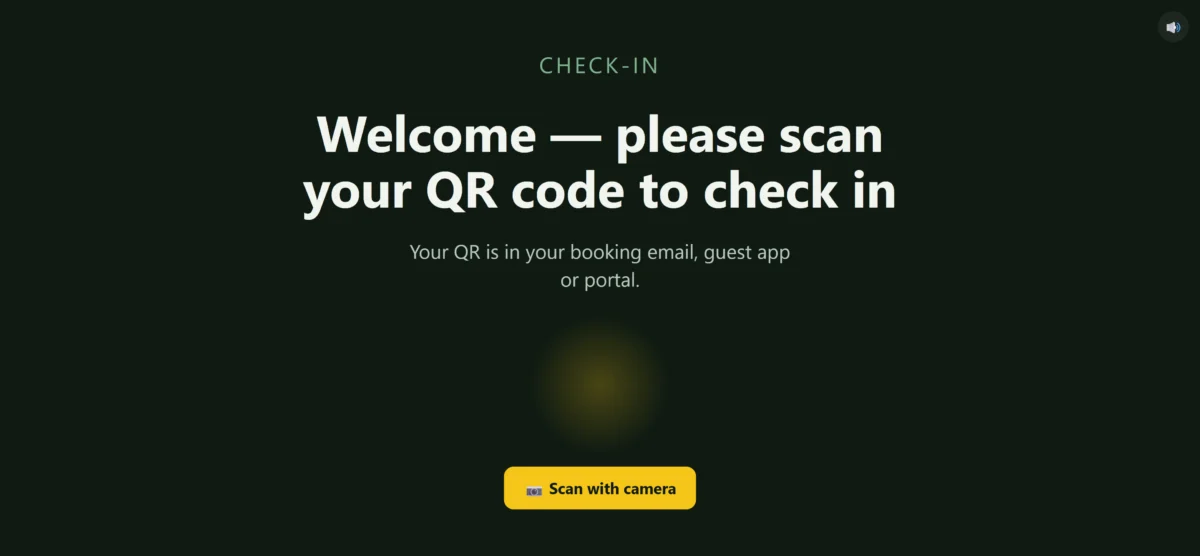
The check-in kiosk. An optional self-service terminal for the gate or reception, so guests can check themselves in at any hour with no staff on hand. They scan the QR code from their booking, a personalised voice greeting welcomes them by name, and they're pointed to their pitch — perfect for late and after-hours arrivals.
One system underneath. Whichever platform you open, you are looking at exactly the same bookings, the same availability and the same guest records. A change made at the gate on a phone is on the office screen before the warden has walked back inside, and a booking taken at the front desk shows up in the warden's pocket straight away. There is only ever one version of the truth, and everyone is always working from it.
Always a way through. Campsites don't stop for technical problems, and neither should your booking system. If a handset dies, a laptop refuses to start or an app picks the worst possible moment to update, the web version is sitting there as an instant fallback on whatever device is nearest. You are never locked out of your own diary, and a check-in queue never has to wait on a single piece of kit.
Fits the team you have. Owners, wardens and office staff each get the tool that genuinely suits their job, rather than everyone crowding around one screen that only half-fits the way they actually work. The warden gets a fast, pocket-sized arrivals view; the office gets a full-width browser workspace on any computer; the owner gets the lot from wherever they happen to be. The system bends to your team, not the other way around.
The Web App — Open It Anywhere
The web app is the Campsite Booking System with absolutely nothing in the way. Log in from any browser, on any device, and you're straight into your live diary — no download to wait for, no installation to approve, no update finishing in the background before you can take a booking. It's the version that's always exactly one click away.
That makes it the workhorse for the in-between moments: the borrowed laptop at reception, the tablet behind the bar, the quick check from the sofa on a Sunday night to see how the weekend filled up. Everything the mobile apps can do, the web app does too, because they're all reading and writing the same live bookings underneath.
And because it runs in the browser, it doubles as your dependable fallback. When a phone is flat or an app is mid-update, the web app is still there on whatever screen is nearest — so there is always a way into your bookings, whatever the day throws at you.

The Mobile App — Built for the Gate

Most of the real work on a campsite never happens at a desk. It happens at the gate, out on the pitches and over in the car park — and that's exactly where the mobile app is built to live. The native iPhone and Android apps put the warden screen straight in your pocket: today's arrivals and departures, who's due, who's paid and which pitch is theirs, all a single glance away.
Check a guest in without trekking back to the office. Take a booking from someone who's just rolled up hopeful at the barrier. Shift a pitch, flag a maintenance problem, or pull up a balance while you're stood right next to the caravan talking to the guest. Each action syncs instantly, so the office always sees what's happening on the ground in real time.
It's designed for one-handed use in the open air — big tap targets, fast loading, and a layout that makes sense whether you're checking in a rush of arrivals or just doing a quiet walk of the site. And with the web app as an emergency fallback, you're covered even if a handset plays up at the worst possible moment.
When there's no one on the gate, the self-service check-in kiosk takes over. Set up a screen at reception or the barrier and guests can check themselves in at any hour — no staff, no waiting, no phone calls. They scan the QR code from their booking email, guest app or portal, and they're checked in on the spot.
It's built for unattended, all-hours use. A personalised voice greeting welcomes each guest by name and points them to their pitch, any balance can be settled right there, and the whole thing runs full-screen on an ordinary tablet or monitor — no special hardware.
Underneath, it's the very same live data as the web and mobile apps — every arrival, balance and availability change in perfect step. The kiosk simply hands the check-in over to the guest, so even a wet midnight arrival is handled without anyone leaving the house.
The Check-In Kiosk — Made for After-Hours Arrivals
One Platform, Every Way of Working
Whatever device you reach for, the Campsite Booking System hands your whole team the same control over the diary, the gate and the day. Here's what comes as standard across every platform.
Run the whole system in any browser, on any device, with nothing to download or update.
Native mobile apps that put the warden and manager screens in your pocket.
Let guests check themselves in after hours with a QR scan and a personalised voice greeting.
Every app reads and writes the same bookings — change it once, see it everywhere.
If a device or app fails, the browser version is an instant way back into your diary.
Owner, warden and office staff each get the view that suits the job they actually do.
Campsite Management Apps — Common Questions
The web app runs in any browser with nothing to install. The native iPhone and Android apps add convenience — pocket access on site for wardens and managers. All of them share the same live data.
Yes. An optional self-service check-in kiosk lets guests check themselves in after hours — they scan the QR code from their booking and a personalised voice greeting welcomes them by name and points them to their pitch.
Yes. The mobile app puts the warden screen in their pocket — arrivals, departures, balances and pitch details — so check-ins happen at the gate, not back at the office.
The web version acts as an instant fallback. As long as you can open a browser, you can get into your diary — you're never locked out.
Yes. Every app reads and writes the same live data. A booking taken at the gate is on the office screen straight away.
Yes. Owners, wardens and office staff each get the view and controls suited to their role, rather than one screen for everyone.
No. The web and mobile management apps are part of the Campsite Booking System — there's no separate charge per platform.
The web app runs on anything with a browser — phone, tablet or computer. There are also native apps for iPhone and Android.
See the Management Apps in Action
Take a proper look around a fully working system across web and mobile — the same diary, arrivals board and booking tools your team would use every day. Then book a quick call and we'll walk you through exactly how it would run on your own site.